v1.0.0 · free forever · no account

BlockSpin Macro
Loops your grind.

Record a grinding sequence once—clicks, keystrokes, everything—and loop it on a hotkey while you play something else or step away. The routine runs exactly as you captured it, as many times as you set, without touching the keyboard again.

No telemetry, offline onlyFree forever, no upgradesNo game injection, clean inputv1.0.0
Record once, loop foreverHotkey controlledSpeed adjustableWorks in fullscreen gamesSaved routines
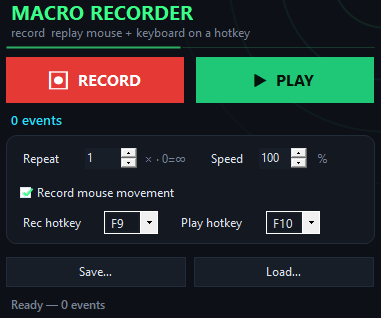
BlockSpin Macro app window on Windows
How it works
Inside the appBlockSpin Macro window

Your grinding loop plays back frame-perfect.

BlockSpin Macro captures every click and keystroke during your routine. When you press the hotkey, it repeats the exact sequence at the same pace, no variation, no mistakes.

Crafting sequencesRecord the click-craft-collect loop, let it run ten times while you do something else.
Farming patternsCapture movement, interact, loot, return to start—then play it back fifty times without touching the mouse.
Keep-alive clicksRecord a short button press that stops logout timers, replay it every few minutes on repeat.
Why it saves time

Why grind manually when the routine can run alone.

These are the things that made BlockSpin Macro the choice for players who want their grinding on schedule, not on their time.

Quick start

Get your first grind loop running in four steps.

You will have a working routine in under a minute.

Manual vs. macro

BlockSpin Macro versus letting the grind slow you down.

This is what changes when you stop doing the same clicks by hand.

Time spent clicking
Zero while looping
Entire session
Mistake rate
Never misses
Lapses happen
Same routine next week
Load the file
Start over
Speed control
Adjustable slider
Your hands only
Cost
Free, forever
Your time
Requires account
No sign-up
Usually required
Questions

Questions about the macro.

Does it work inside fullscreen games?

Yes. BlockSpin Macro sends input at the hardware level, so it reaches fullscreen game windows. The routine plays back the same whether you are in windowed mode or fullscreen.

Can I use it on a game running through remote desktop or streaming?

The input reaches a remote session because it goes through the scan-code layer. Latency from streaming might affect timing, so test your routine before a long loop.

What happens if I press the hotkey during playback?

Press F10 again (or your rebind) to stop the loop immediately. The routine halts and returns control to you.

Does it work on Windows 11?

Yes. BlockSpin Macro is tested and runs on both Windows 10 and Windows 11, 64-bit.

Will the game ban me for using this?

BlockSpin Macro simulates normal keyboard and mouse input—it does not inject code into the game or modify its memory. Whether automation violates the game's terms of service is up to you to check. Some games allow it, others do not.

Do my recordings upload anywhere?

No. BlockSpin Macro runs completely offline. Routines are saved only to your local drive. There is no telemetry, no update ping, no network activity.

Can I use the same routine on another machine?

Yes. Copy the routine file (the .macro file you saved) to another computer, load it in BlockSpin Macro on that machine, and press F10 to run it. If the game layout is different, adjust the speed or coordinates as needed.
Start grinding smarter today.

Download BlockSpin Macro now, record your farming loop once, and let it run while you do anything else.

Download for Windows
Latest release · v1.0.0

BlockSpin Macro guides